
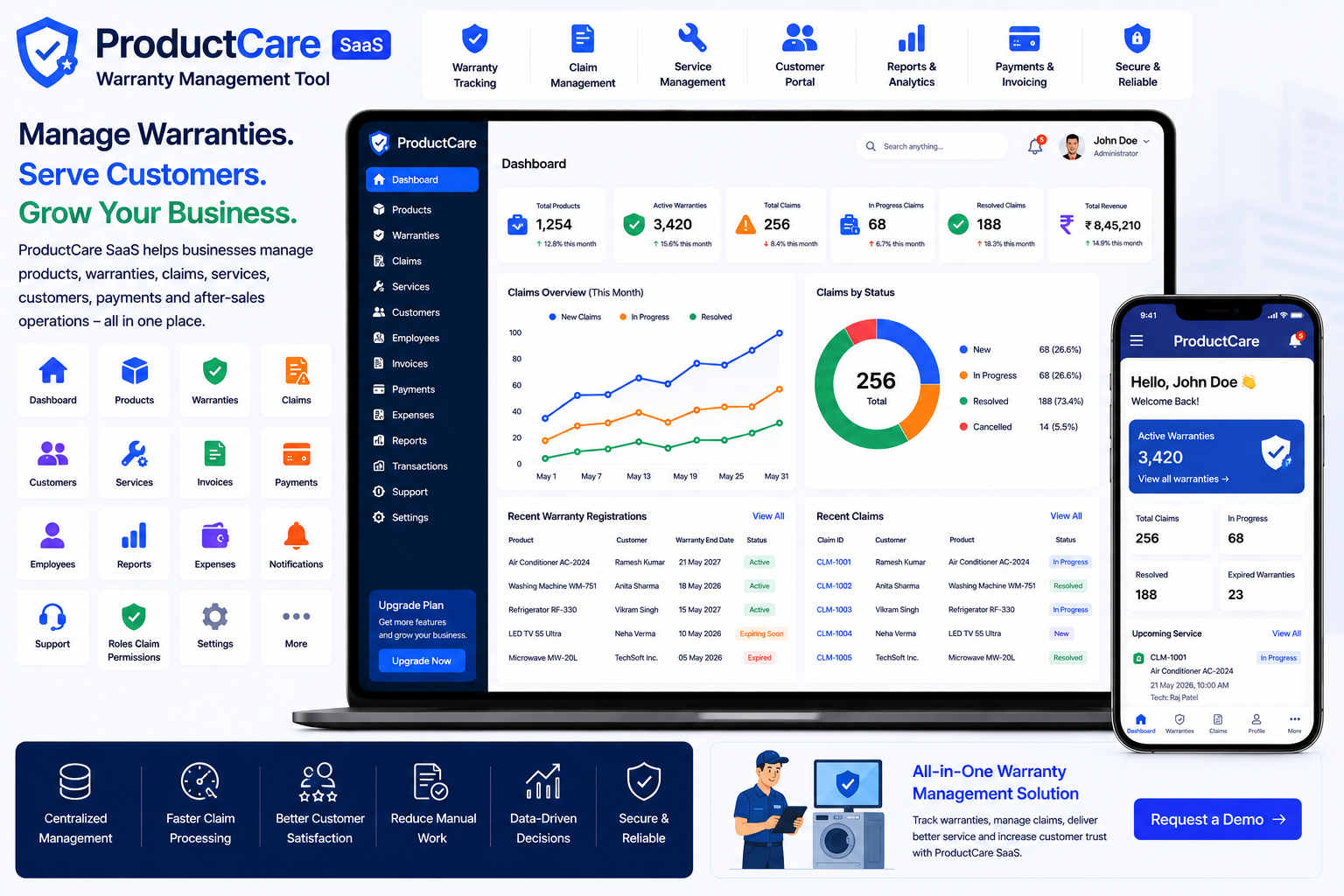
Looking for a ready-made solution?
👉Warranty Management Tool
https://smartwebinfotech.com/items/productcare-saas-warranty-management-tool/1027
Managing product warranties manually can become difficult for manufacturers, retailers, distributors, and service businesses as the number of products and customers grows.
Businesses need to track warranty periods, products, customers, claims, services, payments, and warranty status while ensuring that customers receive timely support.
A Warranty Management Tool provides a centralized digital platform for managing product warranties, customers, warranty claims, services, and related business operations.
In this guide, we'll explore what Warranty Management Software is, its key features, benefits, use cases, and how ProductCare SaaS can help businesses digitize their warranty management process.
ProductCare SaaS – Warranty Management Tool
What Is a Warranty Management Tool?
A Warranty Management Tool is software that helps businesses manage product warranties and after-sales service operations from a centralized platform.
A typical warranty workflow can look like:
Product Sale → Warranty Registration → Warranty Period → Customer Issue → Warranty Claim → Service/Repair → Resolution → Claim Closure
Instead of maintaining warranty information in paper files, spreadsheets, or separate systems, businesses can manage the entire process digitally.
A modern warranty platform can help businesses maintain accurate warranty records while making it easier for customers and service teams to track warranty-related activities.
Why Do Businesses Need Warranty Management Software?
Warranty management can become complicated when a business handles hundreds or thousands of products.
Common challenges include:
- Difficulty tracking warranty periods
- Lost warranty records
- Manual claim processing
- Delayed customer support
- Difficulty verifying warranty eligibility
- Unorganized product information
- Poor service history tracking
- Difficult payment tracking
- Manual reports
- Lack of visibility into warranty claims
A centralized Warranty Management System can help businesses organize these processes and improve after-sales service.
Key Features of a Warranty Management Tool
1. Informative Dashboard
A centralized dashboard provides an overview of warranty and service activities.
Management can monitor information such as:
- Customers
- Products
- Warranty Records
- Warranty Claims
- Services
- Payments
- Employees
- Reports
- Transactions
A dashboard makes it easier to understand the current state of warranty operations.
2. Product Management
Product information is at the center of warranty management.
A product record may include:
- Product Name
- Product Category
- Model
- Serial Number
- Purchase Information
- Customer
- Warranty Period
- Warranty Status
Product management provides a structured database for products covered by warranties.
3. Warranty Management
Warranty management allows businesses to maintain warranty records associated with products and customers.
Important information may include:
- Warranty Start Date
- Warranty End Date
- Product
- Customer
- Warranty Status
- Purchase Date
- Warranty Type
- Warranty Terms
This makes it easier to determine whether a product is still under warranty.
4. Warranty Registration
Customers can register eligible products with the business.
Warranty registration may capture:
- Customer Details
- Product Details
- Purchase Date
- Invoice Information
- Serial Number
- Warranty Period
- Registration Date
Digital registration reduces dependence on paper warranty cards.
5. Warranty Claim Management
Warranty claims are one of the most important components of a warranty management platform.
A claim may contain:
- Customer
- Product
- Warranty
- Claim Date
- Problem Description
- Claim Status
- Assigned Employee
- Service Details
- Resolution
A structured claim workflow helps businesses process customer requests more efficiently.
6. Warranty Claim Status Tracking
Claims can move through multiple stages.
For example:
Submitted → Under Review → Approved → Service in Progress → Resolved → Closed
Status tracking provides businesses with better visibility into every warranty request.
It can also help customer service teams identify delayed or pending claims.
7. Customer Management
A warranty business needs accurate customer information.
Customer records can include:
- Customer Name
- Phone Number
- Address
- Products
- Warranty Records
- Claims
- Service History
- Payments
When a customer contacts support, staff can quickly access their warranty history.
8. Customer Dashboard
A customer portal can provide customers with access to relevant warranty information.
Customers may be able to view:
- Registered Products
- Warranty Details
- Warranty Status
- Claims
- Service Requests
- Payment Information
- Account Details
A customer dashboard can reduce repetitive support inquiries and improve transparency.
9. Service Management
Warranty claims frequently require repair or service work.
A service management module can help businesses manage:
- Service Requests
- Assigned Technician
- Service Date
- Product
- Customer
- Service Status
- Service Notes
- Resolution
This connects warranty claims with after-sales service operations.
10. Technician & Employee Management
Warranty service often requires technicians or employees to inspect and repair products.
Employee management can maintain:
- Employee Profiles
- Contact Details
- Job Assignments
- Service Requests
- Warranty Claims
- Attendance
- Other Work Information
This helps businesses coordinate service teams.
11. Service Assignment
A warranty claim may need to be assigned to a specific technician.
For example:
Warranty Claim
→ Product: Air Conditioner
→ Problem: Cooling Issue
→ Technician: Raj Patel
→ Service Date: August 28
→ Status: In Progress
Assignment management makes responsibility clearer and helps avoid service delays.
12. Warranty Service History
Maintaining service history is valuable for understanding a product's after-sales lifecycle.
Service history can include:
- Previous Claims
- Repairs
- Technician Visits
- Replacement Parts
- Service Dates
- Resolution Details
This information can help technicians understand previous problems before performing additional service.
13. Invoice Management
Warranty and service businesses may need to generate invoices for:
- Paid Repairs
- Out-of-Warranty Services
- Spare Parts
- Additional Services
- Inspection Charges
- Other Billable Work
Invoice management provides a structured way to maintain billing records.
14. Payment Management
Not every service request is necessarily covered by warranty.
For example, a product with an expired warranty may require paid repair.
Payment management can help track:
- Customer
- Invoice
- Amount
- Payment Date
- Payment Method
- Payment Status
This provides better financial visibility.
15. Expense Management
Warranty operations can generate various expenses.
Examples include:
- Spare Parts
- Technician Costs
- Transportation
- Replacement Products
- Service Tools
- Operational Expenses
Expense management helps businesses monitor these costs.
16. Income Management
Businesses may generate income through:
- Paid Repairs
- Extended Warranty Services
- Service Charges
- Spare Parts
- Out-of-Warranty Repairs
- Other Services
Income management helps businesses maintain organized revenue records.
17. Income & Expense Reports
Financial reports help businesses understand the profitability of their service operations.
A basic calculation is:
Total Income − Total Expenses = Operating Result
Reports can help management identify high-cost service categories and understand overall business performance.
18. Warranty Reports
Warranty reports can provide useful information about warranty activity.
Businesses may analyze:
- Active Warranties
- Expired Warranties
- Warranty Claims
- Resolved Claims
- Pending Claims
- Product Warranty Data
These insights can help management improve warranty policies and customer support.
19. Product Warranty Analytics
Warranty data can reveal patterns in product performance.
For example, businesses may identify:
- Products with frequent claims
- Common failure types
- High-service products
- Products with low warranty claim rates
- Recurring customer problems
This information can potentially help manufacturers and retailers improve product quality.
20. Email Notifications
Warranty businesses frequently need to communicate with customers.
Email notifications can be used for:
- Warranty Registration
- Claim Confirmation
- Claim Status Updates
- Service Updates
- Payment Notifications
- Warranty Expiration Reminders
Automated notifications can reduce manual communication.
21. SMS Notifications
SMS can be useful for urgent or time-sensitive warranty updates.
Possible uses include:
- Claim Confirmation
- Service Appointment
- Claim Status
- Repair Completion
- Payment Notification
- Warranty Alerts
SMS integration can provide customers with faster updates.
22. WhatsApp Notifications
WhatsApp provides another convenient communication channel for customers.
Businesses can potentially use WhatsApp notifications for:
- Warranty Claim Updates
- Service Notifications
- Repair Completion
- Payment Information
- Customer Follow-ups
This can make after-sales communication more convenient.
23. User Roles & Permissions
Warranty management platforms may have different types of users.
For example:
- Super Admin
- Business Owner
- Warranty Manager
- Customer Support Staff
- Technician
- Accountant
- Customer
Role-based permissions allow administrators to control which users can access specific modules.
24. Contact Management
Warranty businesses communicate with customers, suppliers, technicians, distributors, and service partners.
Contact management helps maintain important contact information in one centralized location.
This can make it easier for staff to find and manage business contacts.
25. Notes Management
Warranty claims often require additional information.
Examples include:
- Customer Complaint
- Technician Notes
- Product Condition
- Repair Instructions
- Service Recommendations
- Internal Notes
A notes feature allows businesses to maintain important context alongside warranty records.
26. Support Management
Customer support is an important part of warranty operations.
A support system can help businesses manage:
- Customer Questions
- Warranty Issues
- Service Requests
- Complaints
- Support Tickets
- Resolution Information
This creates a more organized customer service process.
27. Payment Gateway Integration
Modern warranty management platforms may support online payments for paid services, subscriptions, or other business transactions.
Payment gateway support can make it easier for customers to pay invoices and service charges online.
28. SaaS Subscription Management
Warranty management software can also be offered as a SaaS platform.
For example, a software provider could offer:
Starter Plan
For small retailers and service providers.
Professional Plan
For growing businesses with larger product inventories.
Business Plan
For manufacturers and companies with larger warranty operations.
Subscription management allows the software provider to manage plans, billing, and customer subscriptions.
29. Subscription Coupon Management
SaaS businesses can use promotional coupons to attract new customers.
Examples include:
- New Customer Discount
- Annual Subscription Offer
- Launch Promotion
- Seasonal Discount
Coupon management helps SaaS operators run promotional campaigns.
30. Dynamic Landing Page CMS
A warranty SaaS platform needs a professional website to attract businesses.
A dynamic landing page CMS allows administrators to manage website content such as:
- Homepage
- Features
- Pricing
- Testimonials
- FAQs
- Contact Information
This allows marketing teams to update website content without modifying the application's core code.
31. SEO Settings
Search engine optimization can help warranty software businesses attract potential customers online.
SEO settings can be used to manage:
- Meta Titles
- Meta Descriptions
- SEO Content
- Social Sharing Information
- Search Engine Settings
This can support long-term organic marketing efforts.
32. Multi-Language Support
Businesses operating in different countries may require multiple languages.
Multi-language support makes the software more accessible to international users.
This is particularly useful for SaaS platforms targeting multiple geographic markets.
33. RTL & LTR Support
Businesses serving Arabic and other right-to-left language markets may require RTL support.
Supporting both RTL and LTR interfaces makes a warranty platform more flexible for international customers.
34. Two-Factor Authentication
Warranty systems can contain customer information, product details, financial records, and service history.
Two-factor authentication adds an additional layer of account security.
It can help protect user accounts against unauthorized access.
Benefits of Warranty Management Software
Improve Warranty Tracking
Businesses can quickly determine whether products are covered by active warranties.
Speed Up Warranty Claims
Digital claim workflows can help customer service teams process warranty requests more efficiently.
Improve Customer Service
Customer information, product history, and warranty records can be accessed from one place.
Reduce Manual Paperwork
Digital warranty registration and claim management reduce dependence on physical warranty cards and paper records.
Improve Service Team Coordination
Technicians and employees can receive structured service assignments.
Track Warranty Costs
Businesses can monitor warranty-related expenses and service costs.
Improve Product Insights
Warranty claim data can reveal recurring product issues and service trends.
Improve Financial Visibility
Invoices, payments, income, and expenses can be organized within the same platform.
Who Can Use a Warranty Management System?
Warranty management software can be useful for:
- Manufacturers
- Product Distributors
- Retailers
- Electronics Companies
- Appliance Businesses
- Automobile Businesses
- Furniture Manufacturers
- Consumer Product Companies
- Equipment Suppliers
- Machinery Manufacturers
- Service Centers
- Authorized Repair Centers
- Extended Warranty Providers
- After-Sales Service Companies
How to Choose the Best Warranty Management Software
Before selecting a warranty management platform, consider:
- Product Management
- Warranty Registration
- Warranty Management
- Warranty Claim Management
- Claim Status Tracking
- Customer Management
- Customer Dashboard
- Service Management
- Technician Management
- Service Assignment
- Service History
- Invoice Management
- Payment Management
- Income Management
- Expense Management
- Warranty Reports
- Product Analytics
- Email Notifications
- SMS Notifications
- WhatsApp Notifications
- Support Management
- Contact Management
- Notes Management
- User Roles & Permissions
- Payment Gateways
- SaaS Subscription Management
- Coupon Management
- Multi-Language Support
- RTL/LTR Support
- Security Features
- SEO Settings
- Customization Options
The best warranty management tool should fit the company's product lifecycle and after-sales service workflow.
Why Choose ProductCare SaaS?
If you're looking for a ready-to-use Warranty Management Tool, ProductCare SaaS by Smartweb Infotech is designed to provide a centralized foundation for managing warranty-related business operations.
It can help businesses organize customers, products, warranty information, claims, services, payments, and other after-sales activities in one platform.
Key Areas of Warranty Management
- Customer Management
- Product Management
- Warranty Management
- Warranty Claims
- Service Management
- Employee / Technician Management
- Invoice Management
- Payment Management
- Income Management
- Expense Management
- Customer Dashboard
- Reports
- User Management
- Roles & Permissions
- Notifications
- SaaS Subscription Management
- Payment Gateway Support
- Multi-Language Support
- RTL/LTR Support
- Security Features
- Landing Page Management
- SEO Settings
Warranty Management Software for Growing Businesses
A small business may initially manage warranties through paper cards, spreadsheets, and customer invoices.
As product sales increase, however, warranty management becomes more complex.
A digital warranty platform can transform:
Paper Warranty Card → Digital Warranty Record
Spreadsheet Product List → Centralized Product Management
Phone-Based Claim Handling → Digital Warranty Claims
Manual Service Register → Service History
Manual Technician Assignment → Structured Service Management
Paper Invoice → Digital Invoice Management
Cash/Bank Register → Payment Tracking
Manual Reports → Warranty & Financial Reports
Manual Customer Follow-Up → Automated Notifications
This can help businesses improve their after-sales service and maintain better control over warranty operations.
Frequently Asked Questions
What is a Warranty Management Tool?
A Warranty Management Tool is software that helps businesses manage product warranties, customers, warranty claims, service requests, payments, and after-sales operations.
Can I manage product warranties?
Yes. A warranty management system can maintain product and warranty information, including warranty periods and status.
Can customers register products?
Product registration functionality can allow businesses to collect customer and product information for warranty tracking.
Can I manage warranty claims?
Yes. Warranty claim management allows businesses to record and track customer warranty requests through different stages.
Can I track warranty claim status?
Yes. Digital claim workflows can track claims from submission through review, service, resolution, and closure.
Can I manage technicians?
Yes. Employee and service assignment functionality can help businesses assign warranty service work to technicians.
Can I maintain service history?
Yes. Service history can provide a record of previous repairs, inspections, and warranty-related services.
Can I manage warranty payments?
Yes. Payment and invoice management can help businesses track paid services and other billable warranty-related activities.
Can I track warranty expenses?
Yes. Expense management can help businesses record spare parts, technician costs, transportation, and other warranty-related expenses.
Can I send warranty notifications?
Email, SMS, and WhatsApp integrations can provide multiple channels for sending customer and service notifications, depending on the configured system integrations.
Can I offer warranty management software as SaaS?
A SaaS-enabled warranty management platform can allow software providers to offer subscription plans to manufacturers, retailers, distributors, and service businesses.
Final Thoughts
Warranty management is an important part of the customer experience after a product has been sold. Businesses need accurate product records, reliable warranty information, efficient claim processing, organized service operations, and timely customer communication.
A modern Warranty Management Tool can bring these activities together in one centralized platform.
From product and warranty registration to claims, service assignments, customer management, invoices, payments, expenses, and reporting, digital warranty software can help businesses improve after-sales service and operational efficiency.
For manufacturers, retailers, distributors, service centers, equipment suppliers, and businesses that manage product warranties, ProductCare SaaS – Warranty Management Tool provides a foundation for digitizing warranty and after-sales service operations.
Comments (0)