
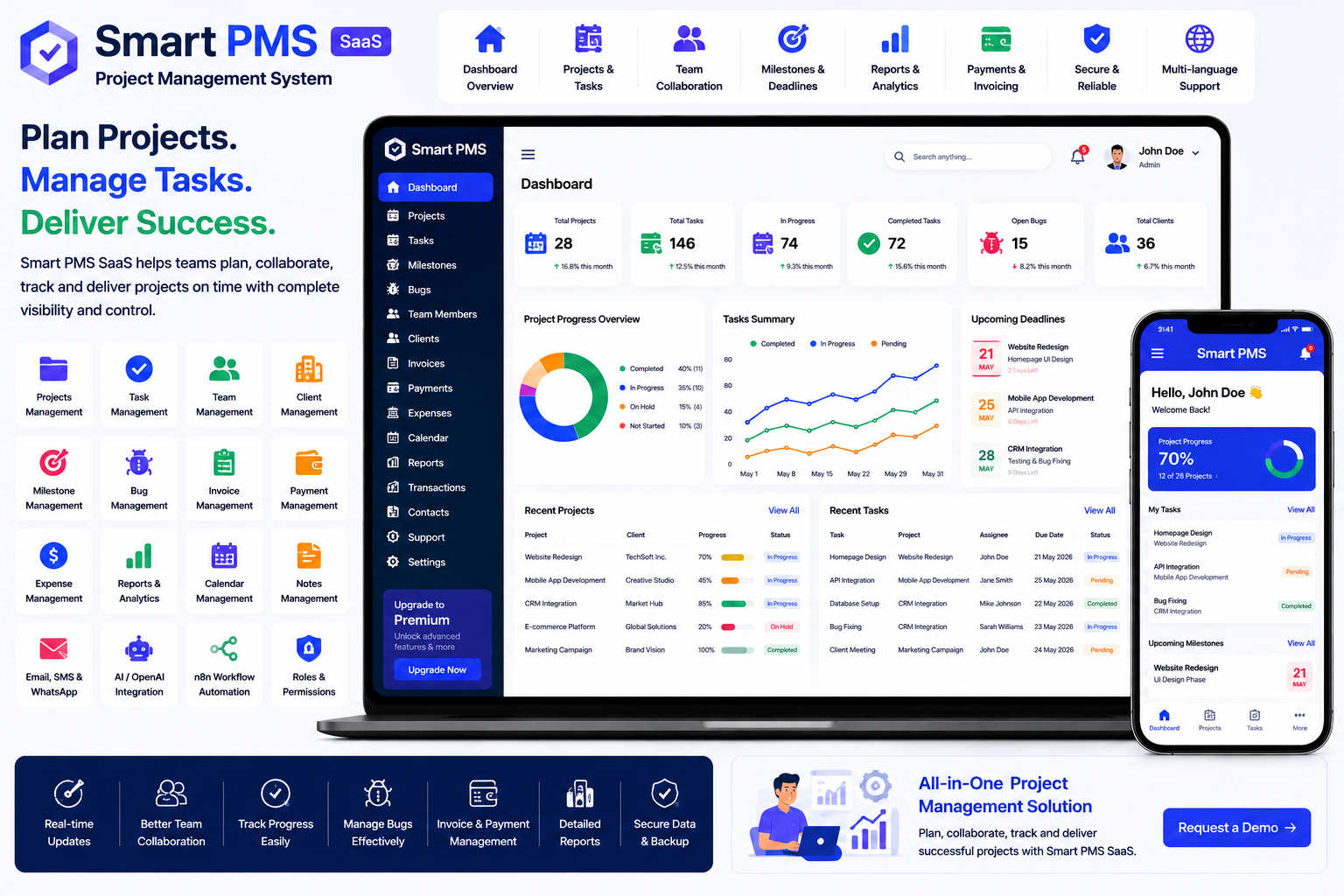
Looking for a ready-made solution?
👉Project Management System
https://smartwebinfotech.com/items/smart-pms-saas-project-managment-system/1003
Managing projects successfully requires more than creating a task list. Teams need to organize projects, assign responsibilities, track tasks, monitor milestones, manage clients, handle project payments, record expenses, and keep everyone informed.
When these activities are managed through spreadsheets, emails, chat applications, and separate documents, it can become difficult to maintain a clear view of project progress.
A Project Management System provides a centralized platform for managing projects, tasks, team members, clients, bugs, milestones, payments, invoices, expenses, and project-related communication.
In this guide, we'll explore what Project Management Software is, its key features, benefits, use cases, and how Smart PMS SaaS can help businesses streamline their project workflows.
Smart PMS SaaS – Project Management System
What Is a Project Management System?
A Project Management System is software that helps organizations plan, organize, execute, monitor, and complete projects through a centralized platform.
A typical project workflow looks like:
Project Creation → Team Assignment → Task Planning → Task Execution → Milestones → Review → Completion → Payment
Instead of maintaining separate spreadsheets and communication channels, project information can be managed from one system.
Smart PMS is positioned as a project and task management system that allows users to create and manage projects and tasks, while its SaaS version provides subscription management capabilities.
Why Do Businesses Need Project Management Software?
As projects become larger and teams become more distributed, manual project management can create several problems.
Common challenges include:
- Missed deadlines
- Unclear task ownership
- Poor project visibility
- Difficulty tracking team members
- Disorganized client communication
- Untracked project expenses
- Difficult payment management
- Poor milestone visibility
- Lost project information
- Manual reporting
A centralized Project Management System can help teams organize project information and improve visibility across the entire project lifecycle.
Key Features of a Project Management System
1. Informative Dashboard
A project management dashboard provides an overview of important project activities.
Managers can use the dashboard to monitor:
- Projects
- Tasks
- Team Members
- Clients
- Milestones
- Bugs
- Payments
- Invoices
- Expenses
- Reports
Smart PMS includes a dedicated dashboard designed to provide an overview of project and task management activities.
2. Project Management
Project management is the core functionality of a PMS.
A project record can include:
- Project Name
- Client
- Project Description
- Team Members
- Start Date
- Due Date
- Project Status
- Tasks
- Milestones
- Payments
- Expenses
Centralizing this information helps managers understand the overall state of each project.
Smart PMS includes Projects and Team Members Management.
3. Task Management
Breaking a project into smaller tasks makes it easier to manage work.
Tasks can be used to define:
- Task Name
- Description
- Assigned User
- Due Date
- Priority
- Status
- Project
- Related Information
For example:
Website Development Project
→ UI Design
→ Homepage Development
→ Database Setup
→ API Integration
→ Testing
→ Deployment
A structured task system makes responsibilities clearer for team members.
4. Project Team Management
Projects often involve multiple people with different responsibilities.
A project management system allows managers to organize team members assigned to each project.
Team members may include:
- Project Manager
- Developers
- Designers
- QA Engineers
- Content Writers
- Sales Staff
- Account Managers
Smart PMS includes project team member management.
5. Client Management
Clients are an important part of many project-based businesses.
Client management can maintain:
- Client Information
- Contact Details
- Projects
- Project Payments
- Invoices
- Expenses
- Communication History
Smart PMS includes dedicated Client Management and a customer/client dashboard.
This allows businesses to keep client information connected with their projects.
6. Client Dashboard
A client portal can provide customers with access to relevant project information.
Depending on permissions, clients can view information such as:
- Projects
- Tasks
- Payments
- Invoices
- Project Progress
Smart PMS includes a Customer Login Dashboard.
A client portal can improve transparency and reduce the need for repeated status-update emails.
7. Milestone Management
Large projects are often divided into milestones.
For example:
Website Project
Milestone 1: Planning
Milestone 2: UI Design
Milestone 3: Development
Milestone 4: Testing
Milestone 5: Launch
Milestones help project managers measure progress against major deliverables.
Smart PMS includes Milestones Payment Management.
8. Bug Management
Software and technology projects frequently require structured bug tracking.
A bug management module can help teams record:
- Bug Title
- Description
- Project
- Assigned User
- Bug Status
- Bug Stage
- Resolution
Smart PMS includes Bug & Bug Stage Management.
This can help development teams track issues separately from normal project tasks.
9. Bug Stage Management
Bugs can move through multiple stages.
For example:
New → Assigned → In Progress → Testing → Resolved → Closed
Bug stage management provides a structured way to monitor issue resolution.
This is particularly useful for software development agencies and technology teams.
10. Project Payment Management
Project-based businesses often receive payments in stages.
For example:
Project Start → 30% Advance
Development → 40% Payment
Final Delivery → 30% Payment
Project payment management can help businesses track payments against projects and milestones.
Smart PMS includes Milestones Payment Management and transaction management.
11. Project Invoice Management
Businesses often need to issue invoices for project work.
An invoice may include:
- Client
- Project
- Services
- Milestone
- Amount
- Tax
- Discount
- Payment Status
The current Smart PMS version includes a dedicated Project Invoice Management module.
This feature was added in the July 2026 update.
12. Project Expense Management
Projects can generate various expenses.
Examples include:
- Software Licenses
- Travel
- Materials
- Freelance Costs
- Advertising
- Equipment
- Third-Party Services
Project expense management allows businesses to associate expenses with specific projects.
Smart PMS includes Project Expense Management, added in the July 2026 update.
13. Project Reports
Project reporting provides management with valuable information about ongoing work.
Reports can cover:
- Projects
- Tasks
- Payments
Smart PMS includes a dedicated report section for Project, Task & Payment information.
Reports can help managers understand project activity and financial progress.
14. Transaction Management
Project businesses may have multiple financial transactions.
Transaction management can help maintain records related to:
- Payments
- Project Transactions
- Subscription Transactions
- Other Financial Activities
Smart PMS includes Manage Transaction functionality.
15. User Management
A project management platform may have multiple users with different responsibilities.
Examples include:
- Super Admin
- Business Owner
- Project Manager
- Team Member
- Client
User management allows administrators to create and manage accounts.
Smart PMS includes User Management.
16. Roles & Permissions
Different users require different access levels.
For example:
- Project managers can manage projects and tasks.
- Team members can access assigned work.
- Clients can view permitted project information.
- Administrators can manage system settings.
Smart PMS includes Role & Permissions Management.
This provides better control over access to project information.
17. Support System
Project-based businesses may need a support system for internal or client communication.
A support system can help users submit and manage support requests.
Smart PMS includes a Support System.
18. Contact Management
Project teams communicate with clients, vendors, partners, and other stakeholders.
Contact management helps maintain important contact information in one place.
Smart PMS includes Contact Management.
19. Notes Management
Project teams often need to record additional information.
Examples include:
- Client Requirements
- Meeting Notes
- Internal Instructions
- Project Decisions
- Follow-Up Information
Smart PMS includes Support / Notes Management.
20. Email Notifications
Email notifications can keep users informed about important project activities.
Potential notifications include:
- Project Updates
- Task Updates
- Payment Notifications
- Account Notifications
- Subscription Notifications
Smart PMS includes email notification settings and configurable email notification templates.
21. SMS Notifications
SMS can provide another communication channel for important updates.
It can be used for:
- Project Notifications
- Payment Notifications
- Account Alerts
- Other System Notifications
Smart PMS includes SMS notification templates and Twilio integration.
22. WhatsApp Notifications
WhatsApp can provide a convenient communication channel for customers and users.
The current version of Smart PMS includes WhatsApp integration for sending notifications.
This feature was added in the July 2026 update.
23. OpenAI Integration
Artificial intelligence can provide opportunities for automating repetitive project-related tasks.
Smart PMS includes OpenAI integration.
Depending on implementation, AI-assisted workflows could potentially help with:
- Project Content
- Task Descriptions
- Client Communication
- Summaries
- Documentation
- Productivity Assistance
AI should be configured according to the organization's data and workflow requirements.
24. n8n Workflow Automation
Businesses often use several applications alongside their project management platform.
n8n can help connect different applications and automate workflows.
Smart PMS includes n8n Integration.
For example, businesses could build workflows around:
Project Event → Automation → Notification → External Application
25. Payment Gateway Integration
SaaS project management platforms may need payment gateways for subscription payments.
Smart PMS supports payment integrations including:
- Bank Transfer
- PayPal
- Stripe
- Flutterwave
- Paystack
- Razorpay
Razorpay was added in the July 2026 update.
26. SaaS Subscription Management
A project management platform can also be offered as a SaaS business.
Platform owners can create subscription packages based on:
- Number of Users
- Projects
- Available Features
- Business Requirements
- Subscription Duration
Smart PMS includes Subscription Management and pricing feature controls.
This allows entrepreneurs to provide project management software to businesses through subscription plans.
27. Dynamic Landing Page CMS
A SaaS platform needs a professional public-facing website.
A dynamic landing page CMS allows administrators to manage website content without modifying the application's core code.
Smart PMS includes Dynamic Landing Page CMS.
28. SEO Settings
SEO is important for businesses that want to attract customers through search engines.
Smart PMS includes Site SEO Settings, allowing administrators to manage SEO-related website settings.
29. Multi-Language Support
Businesses serving international customers may require multiple languages.
Smart PMS supports Multi-Language functionality.
This makes the system more adaptable for different markets.
30. RTL & LTR Support
Businesses serving right-to-left language markets may need RTL support.
Smart PMS includes both RTL and LTR themes.
31. Two-Factor Authentication
Project management systems can contain sensitive client, financial, and business information.
Two-factor authentication provides an additional layer of account security.
Smart PMS includes 2-Factor Authentication.
32. Impersonation Feature
SaaS administrators may sometimes need to troubleshoot customer accounts.
An impersonation feature allows authorized administrators to access a user's account for support purposes without requiring the user's password.
Smart PMS includes an Impersonate Feature.
Benefits of Project Management Software
Improve Project Visibility
Managers can see projects, tasks, team members, payments, and milestones from one platform.
Improve Team Collaboration
Clearly assigned tasks help team members understand their responsibilities.
Reduce Missed Deadlines
Task and project tracking can make upcoming deadlines more visible.
Improve Client Communication
Client dashboards provide customers with access to relevant project information.
Improve Financial Tracking
Project payments, invoices, and expenses can be managed alongside project records.
Reduce Administrative Work
Centralized workflows reduce the need to maintain multiple spreadsheets and documents.
Improve Reporting
Project, task, and payment reports help management understand project performance.
Support Business Growth
SaaS subscription functionality provides a foundation for entrepreneurs who want to offer project management software to other businesses.
Who Can Use a Project Management System?
Project management software can be useful for:
- Software Development Companies
- IT Companies
- Digital Agencies
- Marketing Agencies
- Web Development Agencies
- Construction Businesses
- Consulting Firms
- Engineering Companies
- Creative Agencies
- Freelance Teams
- Service Businesses
- Product Development Teams
- Startups
- Small & Medium Businesses
How to Choose the Best Project Management Software
Before selecting a project management platform, consider:
- Project Management
- Task Management
- Team Member Management
- Client Management
- Client Portal
- Milestone Management
- Bug Management
- Bug Stages
- Payment Management
- Invoice Management
- Expense Management
- Reports
- Transaction Management
- User Management
- Roles & Permissions
- Email Notifications
- SMS Notifications
- WhatsApp Notifications
- AI Integration
- Workflow Automation
- Payment Gateways
- SaaS Subscription Management
- SEO Settings
- Multi-Language Support
- RTL/LTR Support
- Security Features
- Customization Options
The best project management system should match your team's workflow without adding unnecessary complexity.
Why Choose Smart PMS SaaS?
If you're looking for a ready-to-use Project Management System, Smart PMS SaaS by Smartweb Infotech provides a centralized platform for managing projects, tasks, team members, clients, bugs, milestones, payments, invoices, expenses, reports, and business operations.
The current product includes project and team management, client management, bug and bug-stage management, milestone payments, customer login dashboard, project/task/payment reports, invoice and expense modules, OpenAI, n8n, WhatsApp notifications, Razorpay, and SaaS subscription functionality.
Key Features
- Informative Dashboard
- User Management
- Role & Permissions Management
- Client Management
- Project Management
- Project Team Members
- Project Task Management
- Bug Management
- Bug Stage Management
- Milestone Payment Management
- Project Invoice Management
- Project Expense Management
- Transaction Management
- Project Reports
- Task Reports
- Payment Reports
- Customer Login Dashboard
- Support System
- Contact Management
- Notes Management
- Email Notification Templates
- SMS / Twilio Integration
- WhatsApp Notifications
- OpenAI Integration
- n8n Integration
- Bank Transfer
- PayPal
- Stripe
- Flutterwave
- Paystack
- Razorpay
- Subscription Management
- Dynamic Landing Page CMS
- SEO Settings
- Google reCAPTCHA
- Two-Factor Authentication
- Light/Dark Theme
- Multi-Font Styles
- RTL/LTR Support
- Impersonation Feature
- Pricing Feature Controls
The current listing identifies Version 2.0, updated July 20, 2026, with the latest release adding WhatsApp notifications, Razorpay, project invoice and expense modules, and UI/dashboard/project/client improvements.
Project Management Software for Growing Businesses
A small business may initially manage projects using spreadsheets, emails, and messaging applications.
As the number of projects and team members grows, however, manual project management becomes increasingly difficult.
A digital project management platform can transform:
Spreadsheet → Centralized Project Management
Email Task Assignment → Structured Task Management
Manual Team Tracking → Project Team Management
Client Email Updates → Client Dashboard
Paper Milestones → Digital Milestone Tracking
Manual Payment Records → Project Payment Management
Separate Expense Sheet → Project Expense Management
Manual Bug List → Bug Management
Manual Reports → Project & Task Reports
This can help teams improve organization, accountability, and project visibility.
Frequently Asked Questions
What is a Project Management System?
A Project Management System is software that helps businesses plan and manage projects, tasks, team members, clients, milestones, payments, expenses, and project-related activities.
Can I manage multiple projects?
Yes. Project management software allows businesses to maintain project records and organize team members and tasks for individual projects.
Can I assign team members to projects?
Yes. Smart PMS includes project team member management.
Can I manage project tasks?
Yes. Task management is one of the core functions of Smart PMS.
Can I manage project bugs?
Yes. Smart PMS includes Bug & Bug Stage Management.
Can I manage project payments?
Yes. The system includes milestone payment management and transaction management.
Can I create project invoices?
Yes. Project Invoice Management was added in the current Version 2.0 release.
Can I track project expenses?
Yes. Project Expense Management was added in the current Version 2.0 release.
Can clients access project information?
Yes. Smart PMS includes a Customer Login Dashboard.
Does it support WhatsApp notifications?
Yes. WhatsApp integration for sending notifications is included in the current version.
Can I use AI with the project management system?
Yes. Smart PMS includes OpenAI integration.
Can I automate project workflows?
Yes. n8n integration provides a foundation for connecting the project management system with other applications and automating workflows.
Can I offer this project management system as SaaS?
Yes. Smart PMS includes subscription management, pricing feature controls, payment gateways, and a dynamic landing page CMS for SaaS operations.
Final Thoughts
Managing projects efficiently requires clear task ownership, organized teams, transparent client communication, accurate financial records, and reliable progress tracking.
A modern Project Management System brings these activities together in one centralized platform, helping businesses manage the complete project lifecycle.
For software companies, agencies, consultants, service businesses, and entrepreneurs looking to launch a project management SaaS platform, Smart PMS SaaS – Project Management System provides a ready-to-use foundation for managing projects, tasks, clients, teams, milestones, bugs, payments, invoices, expenses, and reports.
With features such as Project & Task Management, Bug Tracking, Milestone Payments, Project Invoices, Project Expenses, Client Dashboard, OpenAI, n8n, WhatsApp Notifications, and SaaS Subscription Management, Smart PMS can support both day-to-day project operations and a scalable SaaS business model.
Comments (0)