
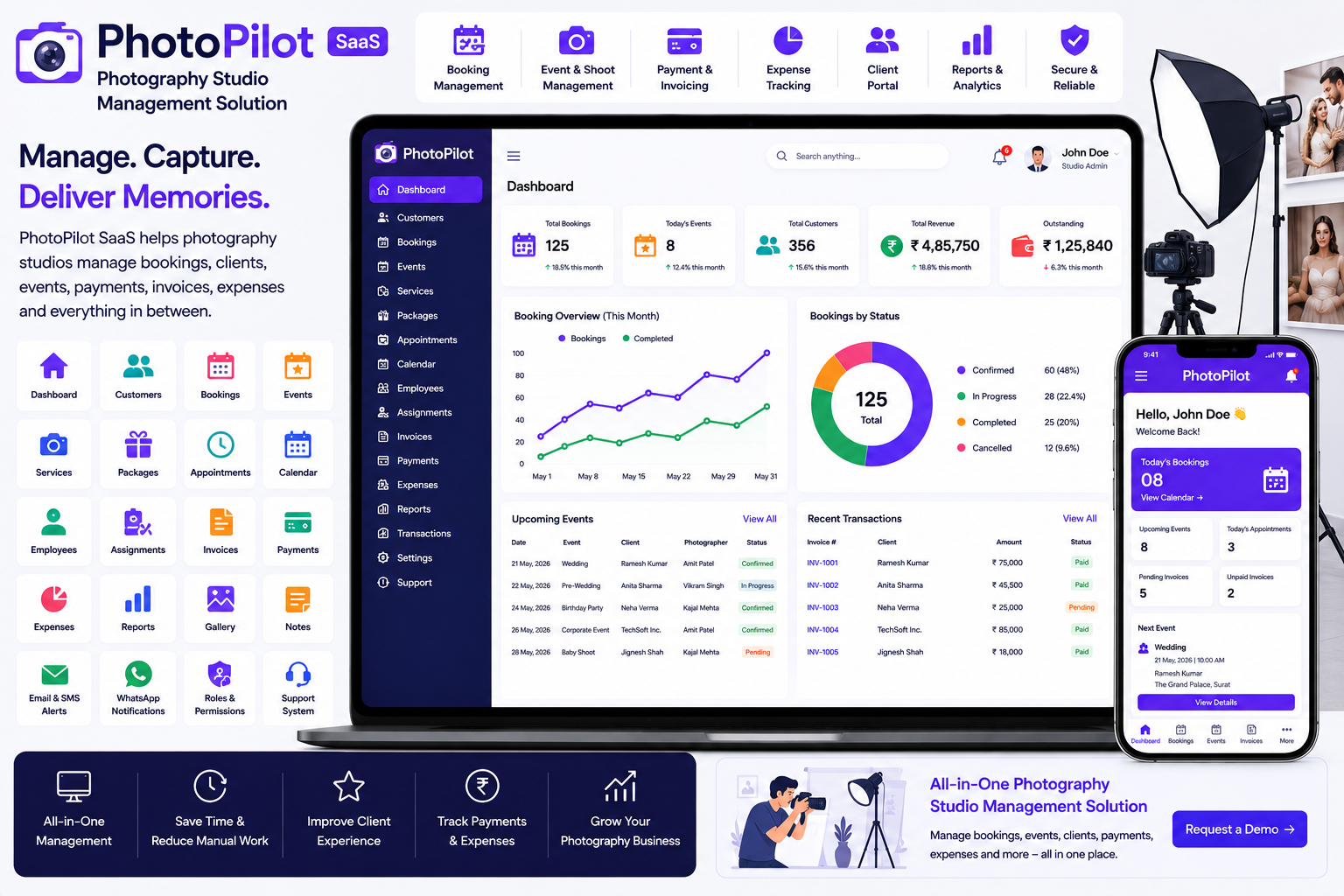
Looking for a ready-made solution?
👉Photography Studio Management Solution
https://smartwebinfotech.com/items/photopilot-saas-photography-studio-management-solution/1030
Running a photography studio involves much more than taking photos. Studio owners need to manage customers, bookings, photography packages, events, appointments, invoices, payments, expenses, employees, and project deliveries.
As the number of clients and bookings grows, managing everything through notebooks, spreadsheets, WhatsApp, and separate applications can become difficult.
A Photography Studio Management Solution provides a centralized platform for managing photography business operations—from customer inquiries and bookings to payments, expenses, and event management.
In this guide, we'll explore what Photography Studio Management Software is, its key features, benefits, use cases, and how PhotoPilot SaaS can help photography studios streamline their daily operations.
PhotoPilot SaaS – Photography Studio Management Solution
What Is a Photography Studio Management Solution?
A Photography Studio Management Solution is software designed to help photographers and photography businesses manage their customers, bookings, services, events, payments, expenses, and other business activities from one centralized platform.
A typical photography workflow can look like:
Customer Inquiry → Service Selection → Booking → Event/Shoot → Payment → Delivery → Customer Follow-up
Instead of managing each step manually, photography businesses can use a digital system to organize their operations.
PhotoPilot SaaS is designed specifically for photography studios and photographers who need a centralized solution for managing their business activities.
Why Do Photography Studios Need Management Software?
Photography businesses often manage multiple bookings simultaneously.
For example, a studio may have:
- Wedding photography
- Pre-wedding shoots
- Birthday events
- Corporate photography
- Product photography
- Portrait sessions
- Baby photography
- Video projects
Managing these bookings manually can lead to:
- Double bookings
- Missed appointments
- Forgotten follow-ups
- Payment tracking problems
- Unorganized customer records
- Difficulty tracking expenses
- Scheduling conflicts
- Poor visibility into business performance
A photography management system can help bring these activities into one organized platform.
Key Features of a Photography Studio Management System
1. Photography Business Dashboard
A centralized dashboard gives studio owners a quick overview of their business.
The dashboard can help monitor:
- Customers
- Bookings
- Events
- Services
- Payments
- Invoices
- Expenses
- Employees
- Reports
- Transactions
Instead of checking multiple spreadsheets or applications, studio owners can access important information from one place.
2. Customer Management
Customer information is one of the most valuable assets of a photography business.
A customer management module can maintain:
- Customer Name
- Contact Details
- Address
- Booking History
- Services
- Events
- Payments
- Notes
When a returning customer contacts the studio, staff can quickly access their previous information.
3. Photography Service Management
Photography studios often provide different services and packages.
Examples include:
- Wedding Photography
- Pre-Wedding Photography
- Event Photography
- Portrait Photography
- Product Photography
- Corporate Photography
- Birthday Photography
- Baby Photography
- Video Production
- Photo Editing
Service management allows businesses to organize their photography services and pricing.
4. Photography Package Management
Many photography businesses sell packages rather than individual services.
For example:
Wedding Package
- 2 Photographers
- 1 Videographer
- Full-Day Coverage
- Edited Photos
- Wedding Album
Pre-Wedding Package
- Outdoor Shoot
- Multiple Locations
- Professional Editing
- Digital Gallery
Package management can make it easier to define what customers receive with each photography package.
5. Booking Management
Booking management is one of the most important features for a photography studio.
A booking record can contain:
- Customer
- Photography Service
- Package
- Booking Date
- Event Date
- Location
- Assigned Photographer
- Payment
- Booking Status
This helps studios keep track of upcoming photography assignments.
6. Photography Calendar
A calendar provides a visual overview of studio bookings and events.
Photographers can use the calendar to monitor:
- Today's Shoots
- Upcoming Events
- Client Appointments
- Wedding Dates
- Studio Sessions
- Availability
This can help reduce scheduling conflicts.
7. Event Management
Photography businesses frequently work on events.
Examples include:
- Weddings
- Engagements
- Birthdays
- Corporate Events
- Conferences
- Parties
- School Events
- Religious Events
Event management can help studios maintain important information about each photography assignment.
8. Event Scheduling
Photography assignments are often time-sensitive.
Event scheduling helps businesses organize:
- Event Date
- Start Time
- End Time
- Location
- Customer
- Assigned Photographer
- Services
- Package
- Notes
This provides photographers and studio managers with a clear schedule.
9. Photographer & Employee Management
A growing photography business may have multiple photographers, editors, videographers, assistants, and other employees.
Employee management can maintain:
- Employee Profiles
- Contact Information
- Assigned Events
- Bookings
- Responsibilities
- Availability
This makes it easier for studio managers to allocate work.
10. Assignment Management
A photography project may involve several people.
For example:
Wedding Project
→ Lead Photographer
→ Second Photographer
→ Videographer
→ Drone Operator
→ Photo Editor
→ Album Designer
Assignment management helps studio owners organize responsibilities for each project.
11. Appointment Management
Photography studios may also have appointments before the actual shoot.
Examples include:
- Customer Consultation
- Package Discussion
- Pre-Shoot Meeting
- Studio Visit
- Photo Selection
- Album Review
Appointment management can help prevent scheduling conflicts and improve customer experience.
12. Invoice Management
Professional photography businesses need proper billing and invoicing.
Invoices can include:
- Customer
- Photography Service
- Package
- Event
- Quantity
- Price
- Discount
- Tax
- Total Amount
- Payment Status
Digital invoices make it easier to maintain financial records.
13. Payment Management
Photography projects often involve advance payments and installments.
For example:
Booking: 30% Advance
Event Date: 40%
Final Delivery: 30%
Payment management allows studios to track these transactions and identify outstanding balances.
14. Expense Management
Photography businesses have many operational expenses.
Examples include:
- Camera Equipment
- Lenses
- Lighting
- Studio Rent
- Travel
- Editing Software
- Albums
- Printing
- Marketing
- Employee Payments
- Equipment Maintenance
Expense management helps studio owners record and categorize these costs.
15. Income Management
A photography business needs to monitor revenue from different services and packages.
Income management can help track:
- Booking Payments
- Package Sales
- Event Revenue
- Additional Services
- Customer Payments
This provides better visibility into business income.
16. Profit & Loss Management
Understanding profitability is important for every photography studio.
By comparing:
Total Income − Total Expenses = Profit/Loss
studio owners can better understand which services and projects are generating profitable results.
A photography management platform can help organize the data needed for this analysis.
17. Customer Dashboard
A customer portal can improve transparency between the studio and its clients.
Customers can potentially access:
- Booking Information
- Event Details
- Services
- Payments
- Invoices
- Account Information
This reduces the need for customers to repeatedly contact the studio for basic information.
18. Reports & Analytics
Business reports can help photography studio owners understand their operations.
Useful reports may include:
- Booking Reports
- Customer Reports
- Income Reports
- Expense Reports
- Payment Reports
- Event Reports
- Profit & Loss Reports
Analytics can help studio owners identify business trends and make better decisions.
19. Email Notifications
Photography businesses communicate with customers throughout the booking lifecycle.
Email notifications can be used for:
- Booking Confirmation
- Appointment Updates
- Payment Confirmation
- Event Reminders
- Invoice Notifications
- Customer Communication
Automated notifications can reduce manual follow-up work.
20. SMS Notifications
SMS can provide another communication channel for photography customers.
Potential uses include:
- Booking Confirmation
- Event Reminders
- Payment Updates
- Appointment Reminders
- Customer Alerts
SMS automation can help improve communication with clients.
21. WhatsApp Notifications
WhatsApp is widely used by businesses to communicate with customers.
Photography studios can use WhatsApp communication for:
- Booking Updates
- Event Reminders
- Payment Notifications
- Customer Follow-ups
- Service Communication
This can provide a faster and more convenient communication channel for customers.
22. User Roles & Permissions
Photography businesses may have multiple users.
For example:
- Super Admin
- Studio Owner
- Studio Manager
- Photographer
- Videographer
- Editor
- Accountant
- Customer
Role-based permissions can help ensure users only access the information they need.
23. Support & Notes Management
Photography projects often have specific customer requirements.
For example:
- Preferred Photo Style
- Event Instructions
- Special Family Photos
- Album Preferences
- Location Instructions
- Delivery Notes
A notes management feature can help staff maintain these details.
24. Payment Gateway Integration
Modern photography businesses may want to accept online payments.
Depending on the platform and configuration, payment gateway support can allow customers to pay deposits, invoices, or service charges online.
Online payments can make the booking process more convenient for customers.
25. SaaS Subscription Management
Photography management software can also be offered as a SaaS product.
For example, a software provider could offer:
Basic Plan
For individual photographers.
Professional Plan
For small photography studios.
Business Plan
For larger studios with multiple employees.
Subscription management allows the platform owner to create and manage different pricing plans.
26. Dynamic Landing Page CMS
A photography SaaS platform needs a professional website to attract photographers and studios.
A dynamic landing page CMS allows administrators to manage public website content.
This can include:
- Homepage
- Features
- Pricing
- Testimonials
- FAQs
- Contact Information
This makes it easier to promote the software online.
27. SEO Settings
Search engine optimization can help photography studios and SaaS providers attract new customers through Google and other search engines.
SEO settings can help administrators manage:
- Meta Title
- Meta Description
- Keywords
- Social Sharing Information
- Search Engine Settings
This can support long-term organic marketing efforts.
28. Multi-Language Support
Photography businesses may serve customers from different regions and countries.
Multi-language support can make software easier to use for international customers.
This can be especially useful for SaaS platforms targeting multiple markets.
29. RTL & LTR Support
If the platform targets markets using Arabic or other right-to-left languages, RTL support becomes important.
A system supporting both RTL and LTR interfaces can provide greater flexibility for international users.
30. Two-Factor Authentication
Photography management platforms may contain customer information, financial records, and business data.
Two-factor authentication adds an additional security layer to user accounts.
This can help reduce the risk of unauthorized account access.
31. AI & Workflow Automation
Modern business software can use AI and workflow automation to reduce repetitive work.
Potential AI-assisted photography business workflows include:
- Generating service descriptions
- Writing marketing content
- Customer communication assistance
- Generating promotional content
- Creating business summaries
Workflow automation can connect photography management software with other applications and automate repetitive processes.
Benefits of Photography Studio Management Software
Better Booking Management
Manage photography bookings and events from one centralized platform.
Reduce Scheduling Conflicts
Calendar and event management help studio owners organize photographers and assignments.
Improve Customer Experience
Customers can receive faster communication and access their booking information.
Improve Payment Tracking
Manage advances, installments, invoices, and outstanding payments more efficiently.
Control Business Expenses
Track equipment, travel, studio, marketing, and other expenses.
Improve Team Coordination
Assign photographers, videographers, editors, and other employees to projects.
Reduce Administrative Work
Digital workflows reduce dependency on notebooks, spreadsheets, and manual records.
Improve Business Visibility
Reports and analytics provide better insight into bookings, income, expenses, and profitability.
Who Can Use a Photography Studio Management System?
Photography management software can be useful for:
- Photography Studios
- Wedding Photographers
- Freelance Photographers
- Event Photographers
- Portrait Studios
- Product Photographers
- Corporate Photography Agencies
- Pre-Wedding Photographers
- Baby Photography Studios
- School Photographers
- Commercial Photography Businesses
- Photography & Videography Agencies
How to Choose the Best Photography Studio Management Software
Before selecting a photography management platform, consider:
- Customer Management
- Photography Services
- Package Management
- Booking Management
- Event Management
- Calendar Management
- Photographer Management
- Employee Management
- Assignment Management
- Appointment Management
- Invoice Management
- Payment Management
- Income Management
- Expense Management
- Profit & Loss
- Customer Dashboard
- Reports & Analytics
- Email Notifications
- SMS Notifications
- WhatsApp Notifications
- User Roles & Permissions
- Payment Gateways
- SaaS Subscription Management
- Multi-Language Support
- RTL/LTR Support
- Security Features
- Automation
- Customization Options
The best solution should match the actual workflow of your photography business rather than forcing your studio to adapt to an unnecessarily complicated system.
Why Choose PhotoPilot SaaS?
If you're looking for a ready-to-use Photography Studio Management Solution, PhotoPilot SaaS by Smartweb Infotech is designed to help photography businesses organize their day-to-day operations through a centralized platform.
It can provide a foundation for managing customers, photography services, bookings, events, payments, expenses, employees, and other studio activities.
Key Areas to Look For
- Informative Dashboard
- Customer Management
- Photography Service Management
- Booking Management
- Event Management
- Appointment Management
- Employee Management
- Payment Management
- Invoice Management
- Income Management
- Expense Management
- Customer Dashboard
- Reports & Analytics
- User Management
- Roles & Permissions
- Notifications
- SaaS Subscription Management
- Payment Gateway Support
- Multi-Language Support
- RTL/LTR Support
- Security Features
- Landing Page Management
- SEO Settings
Photography Management Software for Growing Studios
A small photography business may initially manage everything through WhatsApp, a diary, and spreadsheets.
As bookings increase, however, this approach becomes increasingly difficult.
A digital photography management platform can transform:
Customer Notebook → Digital Customer Management
WhatsApp Booking → Centralized Booking Management
Paper Calendar → Digital Event Calendar
Manual Photographer Allocation → Team & Assignment Management
Handwritten Invoice → Digital Invoice Management
Cash/Bank Register → Payment Management
Separate Expense Sheet → Digital Expense Management
Manual Reports → Business Analytics
Manual Customer Follow-up → Automated Notifications
This can help photography studios spend less time on administration and more time focusing on photography and customer relationships.
Frequently Asked Questions
What is a Photography Studio Management System?
It is software designed to help photographers and studios manage customers, services, bookings, events, employees, payments, expenses, invoices, and business operations.
Can photography studios manage customer bookings?
Yes. A photography management system can centralize customer bookings and event information.
Can I manage photography services and packages?
Yes. Service and package management can help studios organize different photography offerings and pricing.
Can I manage wedding photography projects?
Yes. Photography management software can be used to organize wedding bookings, event dates, assigned photographers, payments, and customer information.
Can I manage multiple photographers?
Yes. Employee and assignment management can help studio owners coordinate multiple photographers, videographers, editors, and other team members.
Can I track photography payments?
Yes. Payment and invoice management can help studios track advances, installments, and outstanding customer balances.
Can I track photography business expenses?
Yes. Expense management can help track costs such as equipment, travel, studio rent, editing software, printing, and marketing.
Can customers access their booking information?
A customer dashboard can provide clients with access to relevant booking, payment, invoice, and account information.
Can I use the system as a SaaS business?
Yes. A SaaS-enabled photography management platform can allow software providers to offer different subscription plans to photographers and photography studios.
Final Thoughts
Photography businesses need to balance creative work with customer management, scheduling, financial administration, and project coordination. As a studio grows, managing these activities through spreadsheets, notebooks, and messaging applications can become increasingly difficult.
A Photography Studio Management Solution brings important business operations into one centralized platform.
From customer management and booking schedules to events, photographers, invoices, payments, expenses, and reports, digital management software can help photography studios improve organization and provide a better customer experience.
For photographers, studios, wedding photography businesses, event photographers, and entrepreneurs looking for a ready-to-use solution, PhotoPilot SaaS – Photography Studio Management Solution provides a foundation for digitizing and organizing photography business operations.
Comments (0)