
Looking for a ready-made solution?
👉Appointment Management System
https://smartwebinfotech.com/items/smart-booking-appointment-management-system/1009
Managing appointments manually can quickly become difficult for businesses that serve customers on a scheduled basis. Phone calls, WhatsApp messages, paper diaries, and spreadsheets can lead to double bookings, missed appointments, scheduling conflicts, and unnecessary administrative work.
An Appointment Management System provides a centralized platform for managing customers, employees, services, appointment schedules, payments, notifications, and business reports.
Whether you run a salon, consultancy, clinic, coaching business, fitness center, repair service, or another appointment-based business, appointment scheduling software can help streamline the booking process and improve customer experience.
In this guide, we'll explore what Appointment Management Software is, its key features, benefits, use cases, and how Smart Booking SaaS can help businesses digitize their appointment operations.
What Is an Appointment Management System?
An Appointment Management System is software that helps businesses schedule, manage, track, and organize customer appointments.
A typical workflow looks like:
Customer → Select Service → Select Employee → Select Date & Time → Book Appointment → Payment → Confirmation → Appointment → Completion
Instead of maintaining appointments in a diary or spreadsheet, businesses can manage their complete booking workflow digitally.
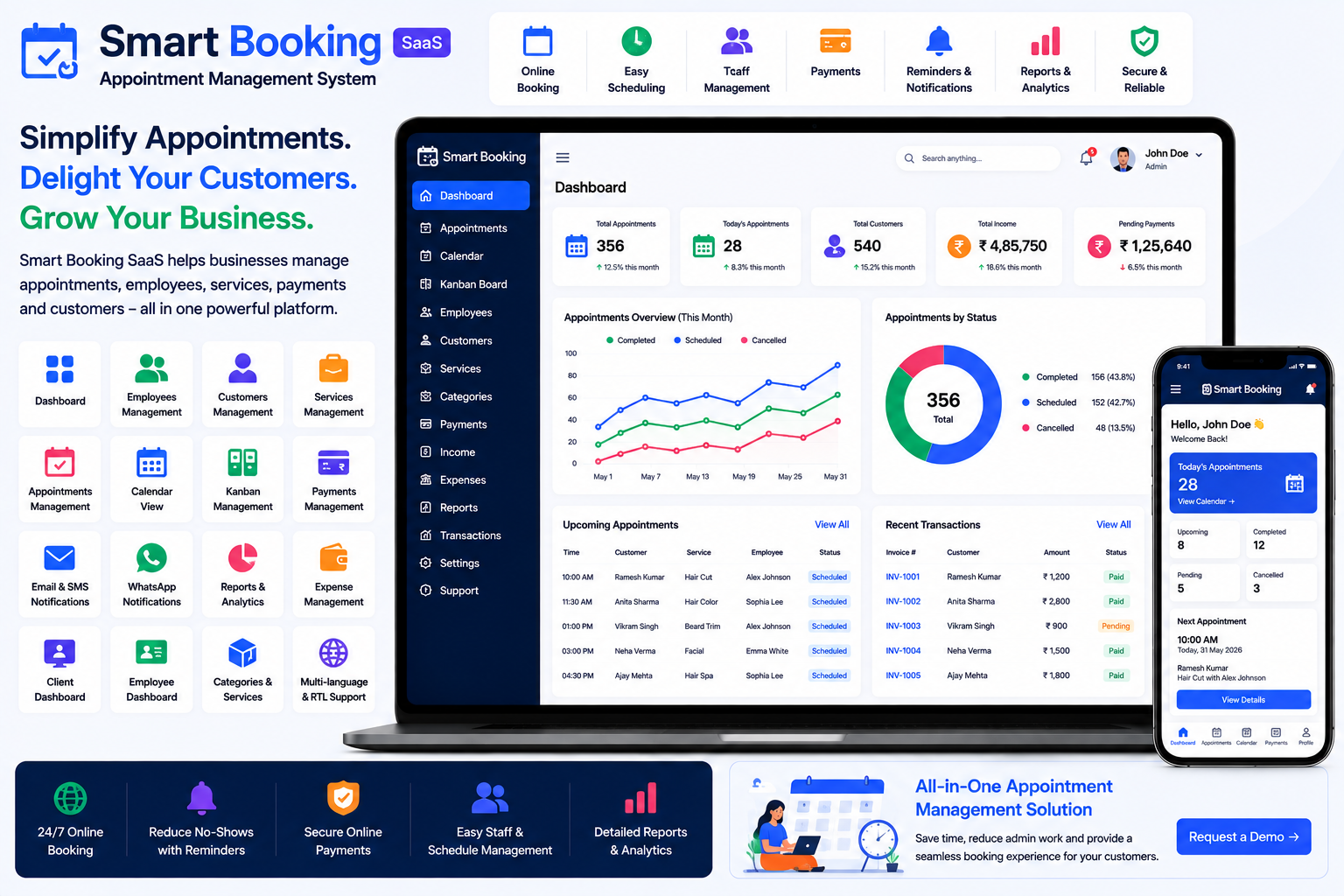
Smart Booking SaaS is a Laravel-based appointment management platform designed to help businesses manage categories, services, employees, customers, appointments, payments, and booking operations from one centralized system.
Smart Booking SaaS – Appointment Management System
Why Do Businesses Need Appointment Management Software?
Manual appointment scheduling can create several challenges.
Common problems include:
- Double bookings
- Missed appointments
- Scheduling conflicts
- Difficult employee availability management
- Manual customer records
- Payment tracking issues
- Time-consuming phone calls
- Lack of appointment history
- Difficulty monitoring daily bookings
- Limited business reporting
A digital appointment system can help businesses organize these processes and provide customers with a more convenient booking experience.
Key Features of an Appointment Management System
1. Informative Dashboard
A centralized dashboard provides an overview of important business activities.
Managers can quickly access:
- Appointments
- Customers
- Employees
- Services
- Payments
- Income
- Expenses
- Reports
- Transactions
This gives business owners and managers better visibility into daily operations.
2. Online Appointment Booking
Online booking allows customers to schedule appointments without calling or visiting the business.
Customers can typically select:
- Service
- Employee
- Date
- Available Time
- Appointment Details
- Payment
This can make appointment booking available beyond normal business hours.
Smart Booking includes a frontend booking system that allows customers to book appointments online.
3. Employee Management
Appointment-based businesses often have multiple employees or service providers.
Employee management allows businesses to maintain:
- Employee Profiles
- Contact Information
- Assigned Services
- Appointment Schedule
- Customer Appointments
- Employee Dashboard
This helps managers organize appointments according to available staff.
Smart Booking includes dedicated Employee Management and an Employee Dashboard Panel.
4. Customer Management
Customer information is essential for appointment-based businesses.
A customer management module can maintain:
- Customer Name
- Contact Details
- Appointment History
- Services
- Payments
- Notes
- Account Information
Having customer history available can help employees provide a more personalized service.
Smart Booking includes Customer Management and a dedicated client dashboard.
5. Appointment Management
Appointment management is the core functionality of the platform.
Businesses can manage:
- Customer
- Employee
- Service
- Appointment Date
- Appointment Time
- Payment
- Appointment Status
- Appointment History
This creates a structured workflow for managing bookings.
6. Appointment Calendar
A calendar provides a visual representation of scheduled appointments.
Managers and employees can use the calendar to understand:
- Today's appointments
- Upcoming bookings
- Available slots
- Employee schedules
- Busy periods
Smart Booking includes an Appointment Calendar.
7. Appointment Kanban Management
A Kanban-style view provides another way to manage appointments.
Appointments can be organized into different stages, such as:
New → Confirmed → In Progress → Completed → Cancelled
This visual workflow can make it easier for staff to monitor appointment status.
Smart Booking's current version includes Appointment Kanban Management, added in July 2026.
8. Appointment Category Management
Businesses may offer different types of appointments.
Categories can help organize services and bookings.
For example:
- Consultation
- Personal Training
- Beauty Services
- Medical Consultation
- Business Meeting
- Repair Service
- Coaching Session
Smart Booking includes Appointment Category Management.
9. Appointment Service Management
Businesses can define the services customers can book.
A service record can include information such as:
- Service Name
- Category
- Duration
- Price
- Assigned Employees
- Description
Customers can then select the required service during booking.
Smart Booking includes dedicated Appointment Service Management.
10. Appointment Payment Management
Businesses can collect payments during the appointment booking process.
Payment management helps track:
- Appointment Amount
- Payment Status
- Payment Date
- Payment Method
- Customer
- Transaction Information
Smart Booking includes Appointment Payment functionality.
11. Payment Gateway Integration
Online payments can make the booking process more convenient for customers.
Smart Booking supports payment integrations including:
- Bank Transfer
- PayPal
- Stripe
- Flutterwave
- Paystack
- Razorpay
The current version lists Razorpay integration, added in July 2026.
This allows businesses to support different payment methods depending on their market and configuration.
12. Employee Dashboard
Employees need a simple way to view their assigned appointments.
An employee dashboard can provide access to:
- Upcoming Appointments
- Customer Information
- Assigned Services
- Appointment Status
- Schedule
Smart Booking includes a dedicated Employee Dashboard Panel.
13. Client Dashboard
A client dashboard provides customers with their own account area.
Customers can access relevant information such as:
- Appointments
- Appointment History
- Payment Information
- Account Details
Smart Booking includes a Client Dashboard Panel.
14. Email Notifications
Automated email notifications can help keep customers and employees informed.
Notifications can be used for:
- Appointment Confirmation
- Booking Updates
- Payment Notifications
- Appointment Status
- Account Notifications
Smart Booking includes configurable email notification settings and notification templates.
15. SMS Notifications
SMS can be useful for communicating important appointment information.
Businesses can use SMS for:
- Booking Confirmation
- Appointment Reminders
- Appointment Updates
- Payment Notifications
- Customer Alerts
Smart Booking includes SMS notification templates and Twilio integration.
16. WhatsApp Notifications
WhatsApp can provide another communication channel for appointment-based businesses.
The current Smart Booking version includes WhatsApp integration for sending notifications, added in July 2026.
This can be useful for booking confirmations and other appointment-related communication.
17. Appointment Reports
Reports help business owners understand appointment activity and business performance.
Smart Booking includes reports covering:
- Appointment Activity
- Income
- Expenses
- Profit & Loss
These reports can help management understand revenue and appointment trends.
18. Income & Expense Management
Appointment-based businesses need to understand both revenue and operating costs.
Income and expense tracking can help monitor:
- Appointment Revenue
- Employee-Related Costs
- Rent
- Utilities
- Marketing
- Equipment
- Other Business Expenses
This provides better financial visibility.
19. Profit & Loss Reporting
Profit and loss reporting provides a broader view of business performance.
By comparing income and expenses, business owners can better understand whether the business is generating sustainable profits.
Smart Booking includes a Profit & Loss Report.
20. Appointment Booking Website
A public-facing booking page can allow customers to schedule appointments directly through the business website.
This can reduce dependency on manual booking channels and provide a 24/7 booking experience.
Smart Booking includes a frontend landing/booking page where customers can book appointments.
21. User Roles & Permissions
Appointment systems often have different users with different responsibilities.
Examples include:
- Super Admin
- Business Owner
- Manager
- Employee
- Customer
Role-based permissions allow administrators to control access to different parts of the system.
Smart Booking includes User Roles and Permissions.
22. Support & Notes Management
Businesses may need to maintain internal notes and support-related information.
Smart Booking includes:
- Support System
- Contact Management
- Support / Notes Management
These features can help businesses maintain additional operational information within the same platform.
23. AI Integration with OpenAI
Artificial intelligence can be used to support business automation and content-related workflows.
Smart Booking includes OpenAI integration, providing a foundation for AI-assisted functionality.
Depending on implementation, AI can potentially assist with tasks such as:
- Generating service descriptions
- Creating business content
- Assisting with customer communication
- Automating repetitive workflows
24. n8n Workflow Automation
Appointment businesses often use multiple applications for communication, CRM, payments, and marketing.
n8n integration can help connect these applications and automate workflows.
Smart Booking includes n8n integration, added in March 2026.
25. SaaS Subscription Management
Appointment management software can also be offered as a SaaS product.
Businesses can create subscription packages based on:
- Number of Employees
- Number of Customers
- Available Features
- Booking Capacity
- Business Requirements
Smart Booking includes Subscription Management and SaaS-oriented pricing functionality.
26. Dynamic Landing Page CMS
A SaaS appointment platform needs a professional website to promote its services.
A dynamic landing page CMS allows administrators to manage public-facing website content.
Smart Booking includes a Dynamic Landing Page CMS.
27. SEO Settings
Search engine optimization can help appointment businesses and SaaS providers attract potential customers through organic search.
Smart Booking includes Site SEO Settings for managing SEO-related website information.
28. Multi-Language Support
Businesses serving customers across different regions may require multiple languages.
Smart Booking includes Multi-Language functionality.
This can make the platform more suitable for international businesses.
29. RTL & LTR Support
Businesses serving Arabic, Hebrew, and other right-to-left language markets may require RTL support.
Smart Booking supports both RTL and LTR themes.
30. Two-Factor Authentication
Appointment platforms can contain customer and business information.
Two-factor authentication adds an additional security layer to user accounts.
Smart Booking includes 2-Factor Authentication.
31. Impersonation Feature
When providing SaaS support, administrators may need to troubleshoot a customer's account.
An impersonation feature can allow authorized administrators to access a user's account for support purposes without requesting the user's password.
Smart Booking includes an Impersonate Feature.
Benefits of Appointment Management Software
Reduce Double Bookings
A centralized booking calendar helps businesses organize appointments and reduce scheduling conflicts.
Save Administrative Time
Customers can book appointments online instead of relying entirely on phone calls or manual booking.
Improve Customer Experience
Customers can select services, employees, and available appointment times through a convenient booking interface.
Reduce No-Shows
Automated email, SMS, and WhatsApp communication can help keep customers informed about upcoming appointments.
Improve Employee Scheduling
Employees can access their appointment schedules and assigned bookings.
Improve Payment Management
Online payment and appointment payment records help businesses maintain better financial records.
Improve Business Visibility
Income, expense, appointment, and profit-and-loss reports provide useful insights into business performance.
Enable Business Automation
OpenAI and n8n integrations provide opportunities for AI-assisted and automated workflows.
Who Can Use an Appointment Management System?
Appointment scheduling software can be used by many types of businesses.
Salons & Beauty Centers
Manage hairstyling, beauty treatments, consultations, and other services.
Clinics & Consultants
Manage scheduled consultations and customer visits.
Fitness & Wellness Businesses
Schedule personal training, coaching, therapy, and wellness sessions.
Consultants
Manage client meetings and professional consultations.
Legal Professionals
Schedule client consultations and meetings.
Repair & Service Businesses
Manage service appointments and customer bookings.
Photography Businesses
Schedule photography sessions and consultations.
Tutors & Coaches
Manage classes, coaching sessions, and individual appointments.
Spas & Wellness Centers
Manage treatments, therapists, services, and customer appointments.
Other Service Businesses
Any business that operates around scheduled customer services can potentially benefit from appointment management software.
How to Choose the Best Appointment Management Software
Before selecting an appointment platform, consider:
- Online Appointment Booking
- Appointment Calendar
- Appointment Kanban
- Employee Management
- Customer Management
- Service Management
- Category Management
- Appointment Payments
- Payment Gateways
- Employee Dashboard
- Customer Dashboard
- Email Notifications
- SMS Notifications
- WhatsApp Notifications
- Reports
- Income Management
- Expense Management
- Profit & Loss Reports
- User Roles & Permissions
- Multi-Language Support
- RTL/LTR Support
- AI Integration
- Workflow Automation
- SaaS Subscription Management
- Security Features
- Customization Options
The best appointment system should fit your business's scheduling workflow and provide enough flexibility to grow.
Why Choose Smart Booking SaaS?
If you're looking for a ready-to-use Appointment Management System, Smart Booking SaaS by Smartweb Infotech provides a centralized platform for managing appointments, customers, employees, services, payments, notifications, reports, and business operations.
The current version includes appointment management, appointment payments, categories, services, employee and client dashboards, SMS/Twilio, WhatsApp, Razorpay, OpenAI, n8n, appointment Kanban, financial reporting, and SaaS subscription functionality.
Key Features
- Informative Dashboard
- User Management
- User Roles & Permissions
- Employee Management
- Customer Management
- Appointment Management
- Appointment Payment
- Appointment Category Management
- Appointment Service Management
- Appointment Calendar
- Appointment Kanban Management
- Employee Dashboard
- Client Dashboard
- Support System
- Contact Management
- Support / Notes Management
- Income Management
- Expense Management
- Profit & Loss Reports
- Appointment Reports
- Transaction Management
- Subscription Management
- Payment Gateway Integration
- Email Notifications
- SMS / Twilio Integration
- WhatsApp Notifications
- OpenAI Integration
- n8n Integration
- Dynamic Landing Page CMS
- SEO Settings
- Google reCAPTCHA
- Two-Factor Authentication
- Multi-Language Support
- RTL/LTR Support
- Light/Dark Theme
- Multi-Font Styles
- Impersonate Feature
- PayPal
- Stripe
- Flutterwave
- Paystack
- Razorpay
Appointment Management Software for Growing Businesses
A small service business may initially manage bookings using a diary or WhatsApp messages.
As the number of customers and employees grows, manual scheduling can become increasingly difficult.
Appointment software can transform:
Paper Diary → Digital Appointment Calendar
Phone Booking → Online Booking
Manual Employee Schedule → Employee Dashboard
Handwritten Payment Record → Digital Payment Management
Manual Reminder → Email/SMS/WhatsApp Notifications
Manual Status Tracking → Kanban Appointment Management
Spreadsheet Reports → Income, Expense & Profit/Loss Reports
This can help businesses improve operational efficiency while providing customers with a more convenient booking experience.
Frequently Asked Questions
What is an Appointment Management System?
An Appointment Management System is software that helps businesses schedule, manage, track, and organize customer appointments, employees, services, payments, and booking information.
Can customers book appointments online?
Yes. Smart Booking provides a frontend booking page where customers can book appointments online.
Can customers select an employee?
The system is designed around employee and service management, allowing businesses to organize appointments around their employees and services.
Can I manage different services?
Yes. Smart Booking includes Appointment Service Management and Appointment Category Management.
Can I accept online appointment payments?
Yes. Smart Booking includes Appointment Payment functionality and supports payment integrations such as PayPal, Stripe, Flutterwave, Paystack, and Razorpay.
Can employees have their own dashboard?
Yes. The system includes an Employee Dashboard Panel.
Can customers have their own dashboard?
Yes. Smart Booking includes a Client Dashboard Panel.
Does it support SMS notifications?
Yes. Smart Booking includes SMS notification templates and Twilio integration.
Does it support WhatsApp notifications?
Yes. The current version includes WhatsApp integration for sending notifications.
Can appointment data be viewed using Kanban?
Yes. Appointment Kanban Management was added in the latest listed version.
Can I use AI with the appointment system?
Yes. Smart Booking includes OpenAI integration, providing a foundation for AI-assisted workflows.
Can I automate workflows?
Yes. n8n integration is included for workflow automation.
Can this appointment system be used as a SaaS business?
Yes. Smart Booking includes subscription management and SaaS-oriented pricing and landing-page functionality.
Final Thoughts
Appointment scheduling is an essential part of many service-based businesses. As customer volume increases, managing bookings through phone calls, paper diaries, spreadsheets, and messaging apps can lead to unnecessary complexity.
A modern Appointment Management System provides a centralized way to manage customers, employees, services, appointments, payments, notifications, and business reports.
For businesses looking for a ready-to-use solution, Smart Booking SaaS – Appointment Management System provides a comprehensive foundation for online booking and appointment management, with features such as appointment calendars, Kanban management, employee and client dashboards, online payments, notifications, reporting, AI integration, workflow automation, and SaaS capabilities.
Comments (0)